



Download Video Compress Pro – Fast, Secure Video Compression Tool for Windows, macOS, Android & iOS
If you’ve ever struggled with massive video files that refuse to fit on a USB stick, email attachment, or cloud‑storage quota, you know the frustration of waiting hours for a transfer to complete. Video Compress Pro steps in as a dedicated video utility that shrinks movies without the need for expensive hardware or complex command‑line tricks. Built for both casual users and video‑editing pros, this app lets you trim, lower bit‑rates, adjust resolution, and even change frame rates with a few clicks.
The result? Smaller files that are easier to share, upload, or archive while still retaining acceptable visual quality. In this review we’ll explore how the software works, which features set it apart, how simple the installation process is, and whether the inevitable loss in image fidelity is worth the massive space savings.
Whether you’re on a Windows desktop, a MacBook, or a mobile device, you’ll learn if Video Compress Pro is the all‑in‑one solution you’ve been waiting for.
Overview
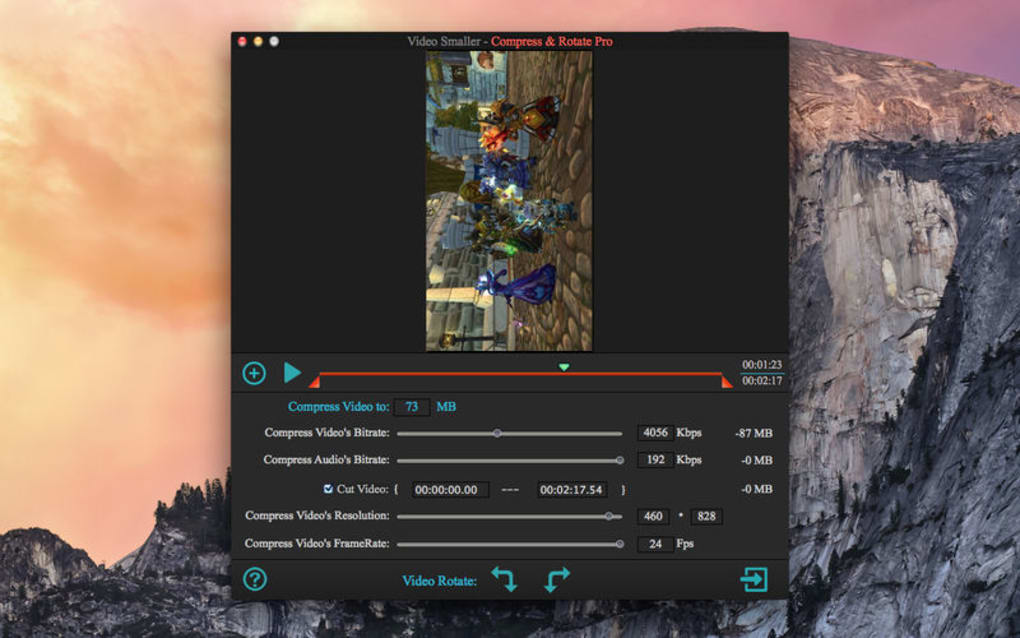
Video Compress Pro – Compressor Smaller Movie is a cross‑platform video compression utility designed to reduce the size of existing video files on your device. By lowering the bit rate, trimming unnecessary footage, and providing granular control over resolution and frame rate, the app can shrink a video up to 30 times smaller than its original size. It supports a broad range of formats—including MP4, MOV, AVI, MPEG, FLV, WMV, and many more—making it a versatile tool for both personal and professional workflows. While the compression process inevitably reduces image quality to some degree, the software’s adjustable settings let you decide which aspects (resolution, frame rate, or bitrate) you’re willing to compromise on, giving you a balanced result that fits your specific needs. Ideal for sharing movies via email, uploading to social platforms, or freeing up storage space, Video Compress Pro offers a user‑friendly interface that hides the technical complexity of video encoding behind intuitive sliders and preset profiles.
Key Features
- Multi‑format support: Handles MP4, MOV, AVI, MPEG, FLV, WMV, MKV, and dozens of other containers without additional codecs.
- Adjustable compression parameters: Control bitrate, resolution, and frame rate independently to fine‑tune the trade‑off between size and visual fidelity.
- Batch processing: Queue multiple videos at once and let the app compress them sequentially, saving you time on large projects.
- Preset profiles: Choose from “Email Friendly,” “Web Upload,” “Mobile Playback,” or create custom presets for recurring tasks.
- Trim and cut tools: Remove unwanted sections before compression to further reduce file size and improve relevance.
- Real‑time preview: See a quick side‑by‑side comparison of the original and compressed video before committing.
- Secure processing: All compression occurs locally on your device; no video data is uploaded to the cloud, ensuring privacy.
- Cross‑platform availability: Native apps for Windows 10/11, macOS 10.13+, Android 6.0+, and iOS 12+.
- Auto‑update feature: The app checks for the latest codecs and performance improvements, keeping your workflow smooth.
Installation, Usage & Compatibility
Getting started with Video Compress Pro is intentionally straightforward. Follow these steps to download, install, and begin compressing your first video:
- Download the installer: Visit the official website or your device’s app store. The Windows version comes as a .exe file, macOS as a .dmg, Android as a .apk, and iOS as a standard App Store package.
- Run the installer: On Windows, double‑click the .exe and follow the wizard (accept the license, choose installation folder, click “Install”). On macOS, drag the app icon into the Applications folder. Mobile users simply tap “Install” and grant storage permissions.
- Launch the application: The first launch may prompt you to allow access to your media library—grant this permission to let the app scan for videos automatically.
- Select a video: Click “Add File” or drag‑and‑drop a video into the main window. The app instantly reads the file’s metadata and displays size, duration, and format.
- Choose a compression preset: For quick results, pick a preset such as “Email Friendly” (max 25 MB) or “Mobile Playback” (720p, 2 Mbps). Advanced users can switch to “Custom” and adjust sliders for bitrate, resolution, and frame rate.
- Trim if needed: Use the built‑in timeline to cut out unwanted sections. This step reduces size even before compression.
- Start compression: Hit “Compress.” A progress bar shows real‑time status, estimated time left, and a preview of the output size.
- Save the output: Once finished, choose a destination folder. The app automatically appends “_compressed” to the filename to avoid overwriting the original.
The software runs on the following operating systems, marked with the appropriate itemprop attribute for search engines:
- Windows 10, Windows 11 (64‑bit)
- macOS 10.13 High Sierra and later
- Android 6.0 Marshmallow and newer
- iOS 12 and newer (iPhone & iPad)
Pros & Cons
- Pros
- Supports virtually every common video format.
- Intuitive UI with real‑time preview.
- Powerful batch processing saves time on large projects.
- All processing is local, preserving privacy.
- Cross‑platform availability means you can use the same tool on desktop and mobile.
- Cons
- Any compression will reduce quality; the best you can do is control the extent.
- Advanced settings may be overwhelming for absolute beginners.
- Free version limits batch size to 5 files; full version required for unlimited processing.
Conclusion, FAQ & Call to Action
Overall, Video Compress Pro delivers exactly what its name promises: a reliable, user‑friendly way to shrink video files dramatically while keeping you in control of the quality trade‑off. The breadth of supported formats, combined with preset profiles and granular customization, makes it suitable for everything from a quick email attachment to a batch‑compress workflow for a small production team. Although you can’t avoid some loss of detail when compressing, the ability to tweak resolution and frame rate means you can preserve the aspects that matter most to you. If you frequently exchange video content, need to free up storage, or simply want a single app that handles all your compression needs across desktop and mobile, the modest price of the full version is well‑justified.
Frequently Asked Questions
Can Video Compress Pro compress 4K videos?
Yes. The app can import 4K (3840×2160) sources, but to achieve meaningful size reductions you’ll typically lower the resolution to 1080p or 720p, or reduce the bitrate. The custom preset lets you decide the exact trade‑off.
Is the compression performed locally or in the cloud?
All compression happens on your device. No video data is uploaded, ensuring full privacy and faster processing since it avoids internet latency.
What is the maximum file size the free version can handle?
The free tier allows compression of files up to 500 MB and limits batch queues to five videos. Larger projects require the paid license.
Does Video Compress Pro support subtitle tracks?
Yes, the app preserves embedded subtitle tracks (SRT, VTT, or embedded) during compression, provided the output container supports them (e.g., MP4 or MKV).
Can I schedule automatic compression of new videos?
The current version does not include a scheduler, but you can set up a simple workflow using OS‑level automation (e.g., Windows Task Scheduler or macOS Automator) to launch the app on new files.
Video Compress Pro stands out as a practical, cross‑platform solution for anyone needing to shrink video files quickly and securely. Its extensive format support, intuitive UI, and powerful batch capabilities make it a solid investment, especially for creators who regularly share content online. While some quality loss is unavoidable, the app’s fine‑tuned controls let you keep the visual fidelity you need. The free version is generous enough for occasional users, and the paid upgrade unlocks unlimited processing—definitely worth the price for power users.







